Pokemon HeX
Free Online Pokémon Save Editor — Right in Your Browser
Upload your save and edit Pokémon, items, Pokédex progress, and trainer data right in the browser — with a built-in legality checker and batch tools. Everything runs locally on your device: free, no signup, and compatible with every generation from Game Boy to Nintendo Switch.
What is Pokemon HeX?
Pokemon HeX is a Pokémon save editor that runs entirely in your browser — powered by PKHeX.Core and covering every generation from the Game Boy Advance titles to Scarlet/Violet on Switch. Load a decrypted save file and edit everything: Pokémon data, items, Pokédex progress, and trainer info, with nothing to install.
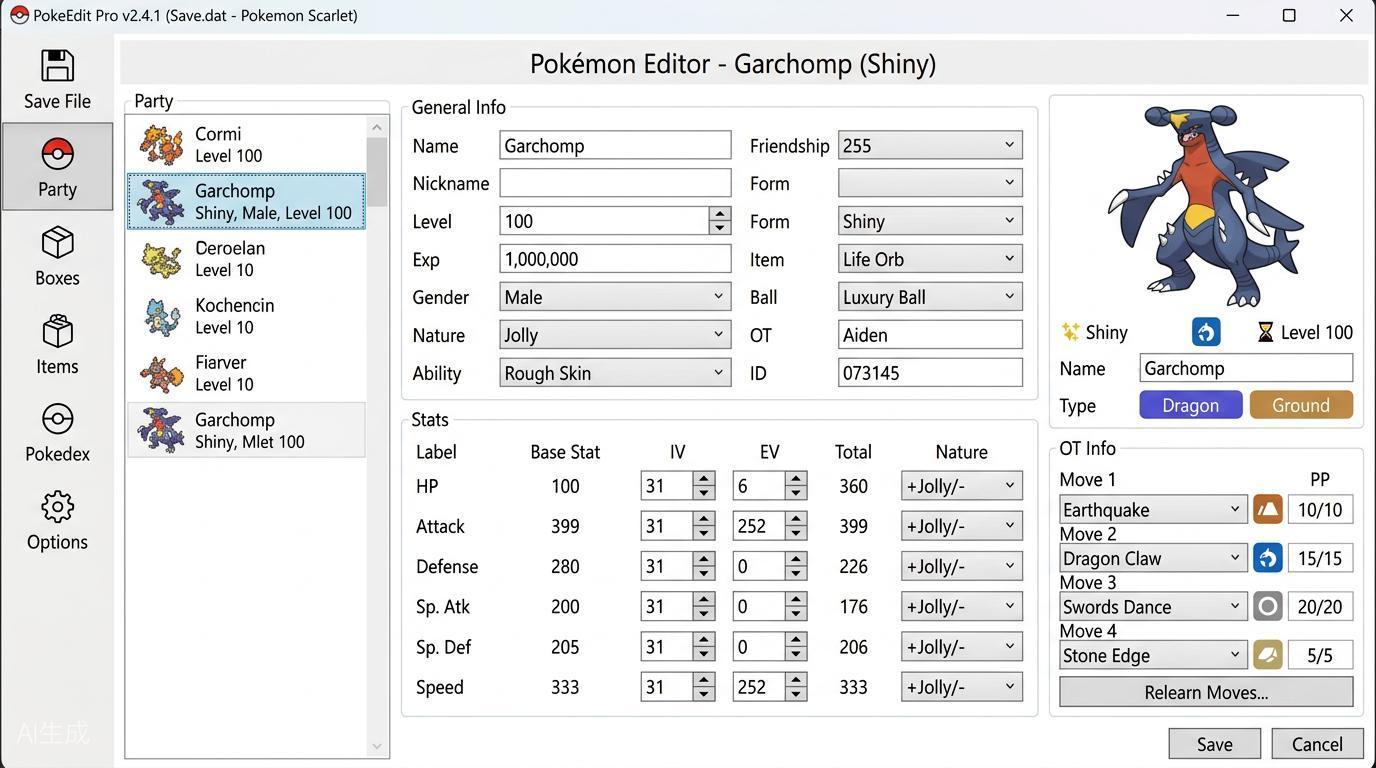
Edit Any Pokémon Detail
Change form, nature, ability, IVs/EVs, moves, shininess, Poké Ball, and more in a couple of clicks.
Runs Entirely on Your Device
Parsing, editing, and legality checks all happen locally in your browser — your save data is never uploaded to any server.
No Installation, Any Platform
Works on desktop, tablet, or phone — just open the page. No save at hand? Load a built-in example save and explore the editor first.
Edit Your Save in Three Steps
All you need is your decrypted save file. Console players dump it with a save manager such as Checkpoint or JKSM; emulator players can open the .sav file directly. The whole edit takes three steps:
Export Your Save File
On 3DS or Switch, dump the save with Checkpoint, JKSM, or SaveDataFiler. Emulator players can use the .sav or .dsv file directly. Encrypted backups from devices like Powersaves are not supported.
Open and Edit in Your Browser
Drag the save into the online editor and change anything: tune your team, complete the Pokédex, add items to your bag, or tidy whole boxes with batch tools.
Check Legality & Export
The built-in legality checker flags illegal edits instantly, with one-click legalization. Review the differences against your original save, export the file, and restore it to your console or emulator to keep playing.
What You Can Do with Pokemon HeX
A complete online toolkit for viewing, editing, and verifying Pokémon saves across every generation.
Instant Legality Checker
Every Pokémon is validated against real encounter data. Legalize with one click, or scan all boxes at once to spot illegal specimens and clones.
Showdown Export & Sharing
Copy and export Pokémon Showdown sets to share teams with friends.
Batch Editor
Heal a whole box, make everything shiny, sort by species or level, and remove duplicates — organize hundreds of Pokémon in a few clicks.
Built-in Example Saves
No save file at hand? Load one of the fully legal example saves covering Generations 1–8 and try every editor feature right away.
Items, Pokédex & Trainer
More than Pokémon: manage bag items, complete Pokédex progress, and edit trainer name, money, play time, and badges.
Change Log & Diff Review
Every edit is recorded. Before exporting, compare with the original save to see exactly what changed.
Frequently Asked Questions
Answers to the questions trainers ask most before editing their first save.
Why won't the editor open my save file?
Only decrypted saves can be read. Backups made with Powersaves or Sky3DS stay encrypted and cannot be opened. Dump the save from your console with Checkpoint, JKSM, or SaveDataFiler, or use the raw .sav file from your emulator.
Can edited Pokémon be traded or used online?
Pokémon that pass the legality checker behave like legitimately obtained ones. Never trade or battle with significantly hacked Pokémon without the other player knowing — it can ruin their game and risk penalties on your account.
Online editor vs desktop PKHeX — which should I use?
The online editor runs in your browser with nothing to install and covers everyday editing. The desktop PKHeX (Windows) offers the deepest advanced tooling. Both share the same PKHeX.Core engine, so legality results are identical.
Is my save data uploaded anywhere?
No. Parsing, editing, and legality checks all run locally in your browser — your save file never leaves your device.
Which Pokémon games are supported?
Every core-series title: Gen 1–2 battery saves, GBA and DS games, all 3DS titles (X/Y, ORAS, Sun/Moon, USUM), Switch games (Let's Go, Sword/Shield, BDSP, Legends: Arceus, Scarlet/Violet), and the GameCube games Colosseum and XD.
Which file formats are supported?
Decrypted save files (main, .sav, .dsv, .srm, .dat, .bin).
Will editing my save get my account banned?
Editing a save on its own does not trigger bans, but using illegal or obviously hacked Pokémon in online play can lead to restrictions. Always run the legality checker, keep your edits plausible, and back up your original save first.